

Pre sales consultant
Dokobit Portal vs API: Which electronic signing solution is right for your business?
Your HR team needs to send an employment contract today. Meanwhile, your IT department is building an automated signing process for thousands of customer agreements.
Both need electronic signatures, but they don't necessarily need the same solution.
The choice between an electronic signature portal and an API depends on how signing fits into your business. Some teams need a ready-to-use solution, while others need signing embedded directly into existing systems.
With Dokobit by Signicat, businesses can choose a ready-to-use Portal, an API integration, or a combination of both.
What is the difference between an electronic signature portal and an API?
An electronic signature portal is a ready-to-use application where employees can upload documents, invite signers and track progress through a web interface. No development work is required.
An electronic signature API integrates signing into your existing software, allowing you to automate workflows and offer signing directly within your applications.
Both can support secure, legally valid electronic signatures. The right choice depends on signing volume, automation requirements, development resources and the experience you want to offer users.
When should you choose the Dokobit Portal?
The Dokobit Portal is ideal for teams that need to send, sign and manage documents without building an integration.
1. When you need to start signing immediately
Not every signing requirement justifies an IT project. Whether HR needs to issue employment contracts, legal needs an agreement approved or procurement needs a supplier's signature, the Portal lets employees upload documents, add signers and send invitations directly from their browser. There's no integration to develop, making it a practical option for businesses moving away from paper-based processes.
2. When signing volumes are manageable
If employees only send a limited number of agreements each month, a custom integration may be unnecessary. The Dokobit Portal provides team-based document management, including approvals, shared document categories and access management.This makes it useful for HR, finance, legal and operations teams that need a shared signing solution without relying on developers.
3. When signing requirements are occasional or unpredictable
Not every document follows a standard workflow. Board resolutions, one-off agreements and documents involving external partners may need to be handled individually. The Portal allows employees to manage these requests without modifying existing systems. It can also support qualified electronic signatures (QES), depending on the available signing methods and the signer's circumstances.Importantly, the Portal isn't just for small businesses. Large organisations can use it alongside their existing automated signing processes.
When is an electronic signature API the better choice?
An electronic signature API makes sense when signing is a regular part of an existing application or business process.
1. When you manage high volumes of documents
Consider an insurance company processing thousands of customer agreements. Manually preparing, uploading and sending each document would create considerable administrative work. With an API, documents can be generated, signing requests initiated and outcomes processed through existing systems. However, volume alone doesn't justify integration. The consistency of the workflow and time spent on manual administration matter just as much.
2. When signing is part of a larger customer journey
For banks, insurers and fintechs, signing is often one step in a digital process. A customer might complete an application, verify their identity, review contractual terms and sign an agreement. An API allows businesses to incorporate signing into that journey rather than requiring customers to switch between platforms. This gives organisations greater control over the user experience, branding and workflow.
3. When you have development resources
API integration provides flexibility, but requires technical expertise. Your developers need to build and maintain the integration, manage authentication and document exchanges, and handle errors. If signing is a regular part of a business-critical application, that investment may be worthwhile. For a handful of agreements each week, a portal is likely to be more practical.
Where does Signicat Sign API v2 fit?
Signicat Sign API v2 supports organisations that want to manage electronic signing within their own applications. It's particularly relevant for complex workflows involving multiple signers, documents and signing steps. For businesses operating in European markets where electronic identities are widely used, including the Nordics, it can support signing processes based on electronic identification.
Signicat also offers the Dokobit Universal API, which provides different integration capabilities, including document signing, electronic sealing and qualified signature validation.
Choosing an API is therefore only part of the decision. Businesses also need to consider which API supports their required signing methods, countries, workflows and document services.
Why use both the Portal and an API?
For many organisations, the best approach is to combine the two.
A bank, for example, might use Signicat Sign API v2 to automate thousands of customer agreements while its legal and HR teams use the Dokobit Portal for occasional contracts and internal documents.
The Portal also supports document validation, allowing teams to verify electronic signatures and seals on documents received from third parties.
For businesses operating across European markets, it may offer additional signing options, subject to supported countries, electronic identities and signature levels.
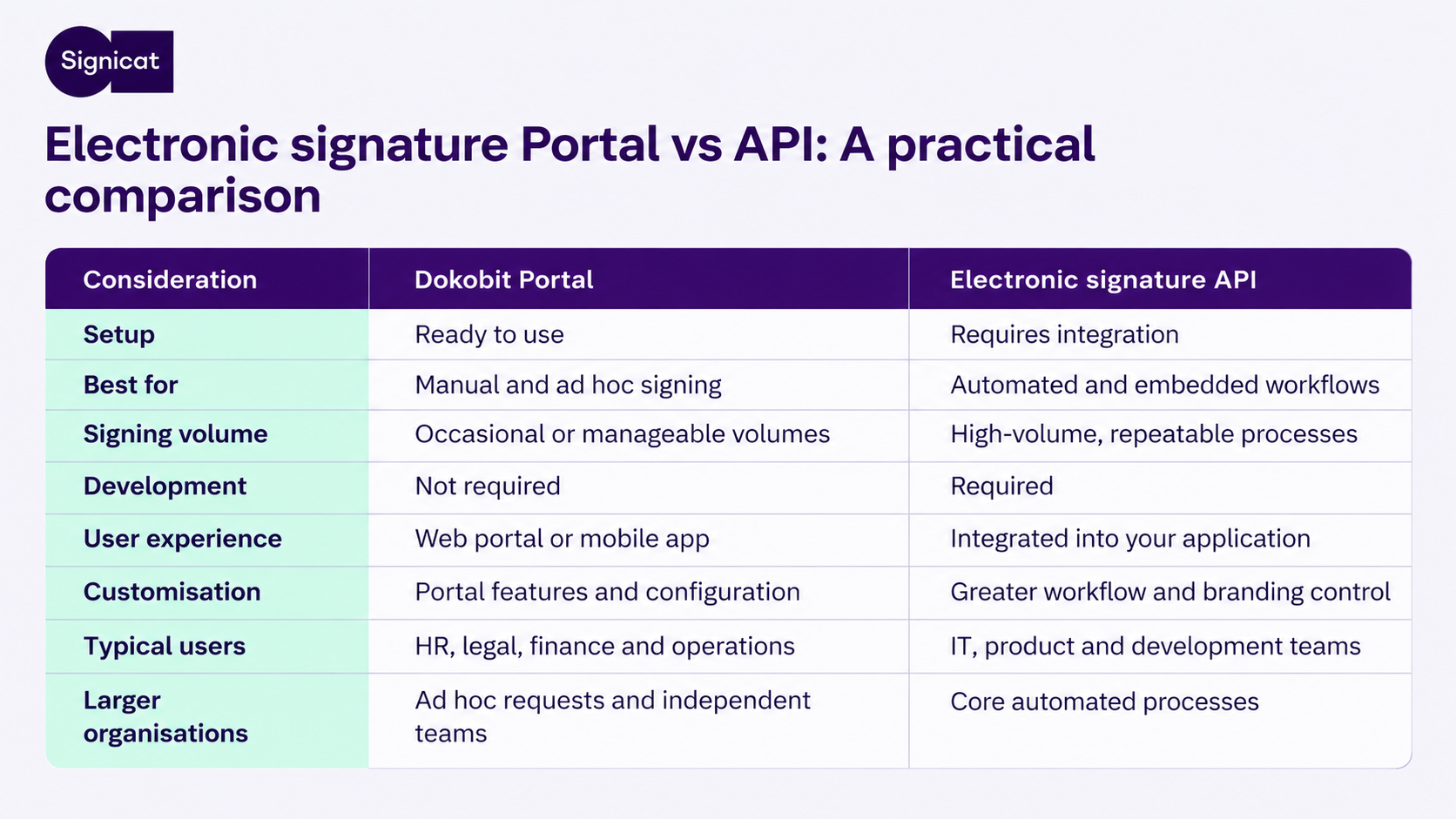
The distinction is straightforward: use APIs for predictable, repeatable workflows and the Portal for signing that requires direct employee involvement.
This avoids building unnecessary complexity into your core systems.
What about qualified electronic signatures and eIDAS?
Under the EU's eIDAS framework, electronic signatures are generally divided into three levels:
- Simple electronic signatures (SES)
- Advanced electronic signatures (AES)
- Qualified electronic signatures (QES)
A QES has the equivalent legal effect of a handwritten signature under eIDAS, although not every transaction requires one.
Both portal-based and API-based services can support different signature levels. The important factor is choosing a service and signing method that meets your legal and business requirements.
Businesses should also consider document validation, storage and long-term preservation, particularly for agreements that must remain verifiable for years.
Which electronic signing solution should you choose?
Start with how signing works in your organisation.
Choose the Dokobit Portal if employees need to prepare, send and manage documents themselves without technical integration.
Choose an electronic signature API if signing needs to be automated or embedded into an existing application.
Use both if your organisation handles high-volume automated signing alongside occasional or specialised document requests.
Dokobit by Signicat offers both ready-to-use and API-based electronic signing solutions, giving businesses the flexibility to choose what fits their workflows.